Vertical Desk Calendar: A Designer's Template for Year-Round Branding
For entrepreneurs, marketers, and creatives, a desk calendar is more than a simple date tracker. It’s a 12-month branding opportunity, a functional art piece, and a daily touchpoint with your audience or team. The challenge has always been creating something that looks professionally designed without the steep learning curve or budget. This is where a robust creative template changes the game, offering a structured yet flexible foundation to build upon.
Understanding the Vertical Desk Calendar Template
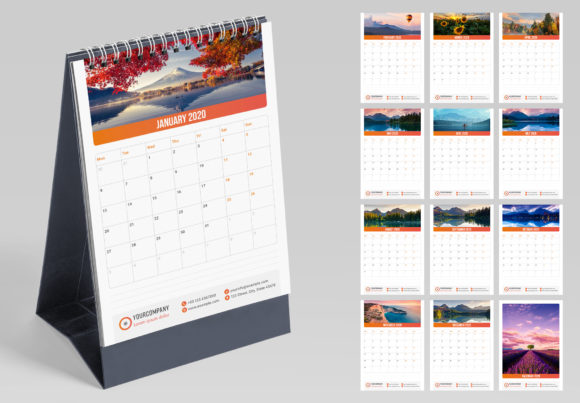
At its core, this Vertical Desk Calendar template is a meticulously crafted Adobe InDesign file designed for efficiency and professional output. It arrives with a cover and 12 monthly pages, all laid out in a clean, vertical A5 format—a popular size for its substantial feel without taking up excessive desk space. The visual personality is intentionally versatile; it’s a blank canvas with a modern, clean aesthetic. The style prioritizes clarity and elegance, using ample white space, well-defined grids, and thoughtful typography placeholders. This approach ensures the final product feels contemporary and professional, regardless of the specific branding you apply to it.
The real value lies in its "ready for print" engineering. Every element is set at 300 DPI with 3mm bleeds, ensuring crisp, edge-to-edge printing with no frustrating white borders. The document is fully layered, meaning you can isolate and edit text, shapes, and background elements independently. This level of organization is a hallmark of a premium design asset, saving you from the chaos of a flattened, uneditable file.
Practical Applications Across Industries
The adaptability of this template makes it a powerful tool for a wide range of projects. For a small business owner or entrepreneur, it can be transformed into a branded corporate gift. Imagine a calendar for a local café featuring monthly specials, or for a fitness studio highlighting motivational quotes and class schedules. The consistent branding reinforces recognition all year long.
Designers and agencies will find it invaluable for client projects. It serves as a perfect starting point for creating custom merchandise, promotional items for product launches, or elegant internal tools. For bloggers and content creators, it’s an opportunity to repurpose content—turning a series of illustrated quotes, photos, or data visualizations into a tangible product for their community. Crafters and hobbyists can use it to design personalized gifts, showcasing family photos, children’s artwork, or travel memories in a polished format.
Streamlining Your Design Workflow
Where this template truly excels is in eliminating repetitive, time-consuming tasks. The inclusion of pre-built Paragraph and Character Styles is a game-changer for maintaining consistency. Instead of manually formatting each month’s header, date numbers, and notes, you simply apply a style with one click. This ensures perfect alignment, font sizing, and spacing across all 13 pages. You can easily adjust the text in a single step by modifying the style definition, and changes will propagate automatically as you type.
Color management is equally streamlined. The template utilizes Adobe Swatches, allowing you to change the entire color scheme of the calendar with a single click. This is perfect for matching a client’s brand palette or experimenting with seasonal themes. You can shift from a corporate blue-and-gray scheme to a vibrant, playful palette in seconds, instantly altering the mood and appeal of the final product. This one-click change color feature is not a gimmick; it’s a profound efficiency boost for any design project involving multiple color explorations.
Making It Your Own: Customization and Final Output
Customization is designed to be intuitive. All fonts, shapes, and elements are easy to edit. You can swap out placeholder text with your own copy, adjust the size and position of graphic elements, and even add your own logos or icons. The layered document structure means you won’t accidentally move the background while trying to edit a date. This thoughtful organization respects your time and reduces frustration during the creative process.
When your design is complete, the template is built for seamless output. The files are compatible with a wide range of Adobe InDesign versions, from CS4 to the latest Creative Cloud release (INDD and IDML formats are included). A PDF preview file is also provided, so you can see exactly what the finished calendar will look like before committing to a print run. This compatibility ensures that whether you’re working on an older machine or the latest software, you can get started immediately without technical hiccups.
Ultimately, this Vertical Desk Calendar template is more than just a set of pages; it’s a professional workflow accelerator. It empowers you to produce high-quality, print-ready design assets efficiently, allowing you to focus on the creative strategy and branding message rather than the technical setup. For anyone looking to create a functional and beautiful piece of branded collateral, it provides a reliable and sophisticated foundation.